
Start Here
Whether you're learning inspectagram for the first time or preparing
to teach it, start here.
Get set up. Learn the method. See it in action.
1
Get set up
Download inspectagram and activate your free access.
Open
Get set up
Download inspectagram and activate your free access.
You should have received an inspectagram redemption code from your school. This code gives you free access to the app.
Download inspectagram, create your account and redeem your code inside inspectagram.
Do not subscribe through Apple or Google.
Your school-provided code gives you access. You do not need to purchase a subscription through the App Store or Google Play at this time.If you accidentally subscribed through Apple or Google, check the subscription settings on your phone and cancel that subscription.
Choose Apple, Google or email when you create your account. Use the same option every time you log in.
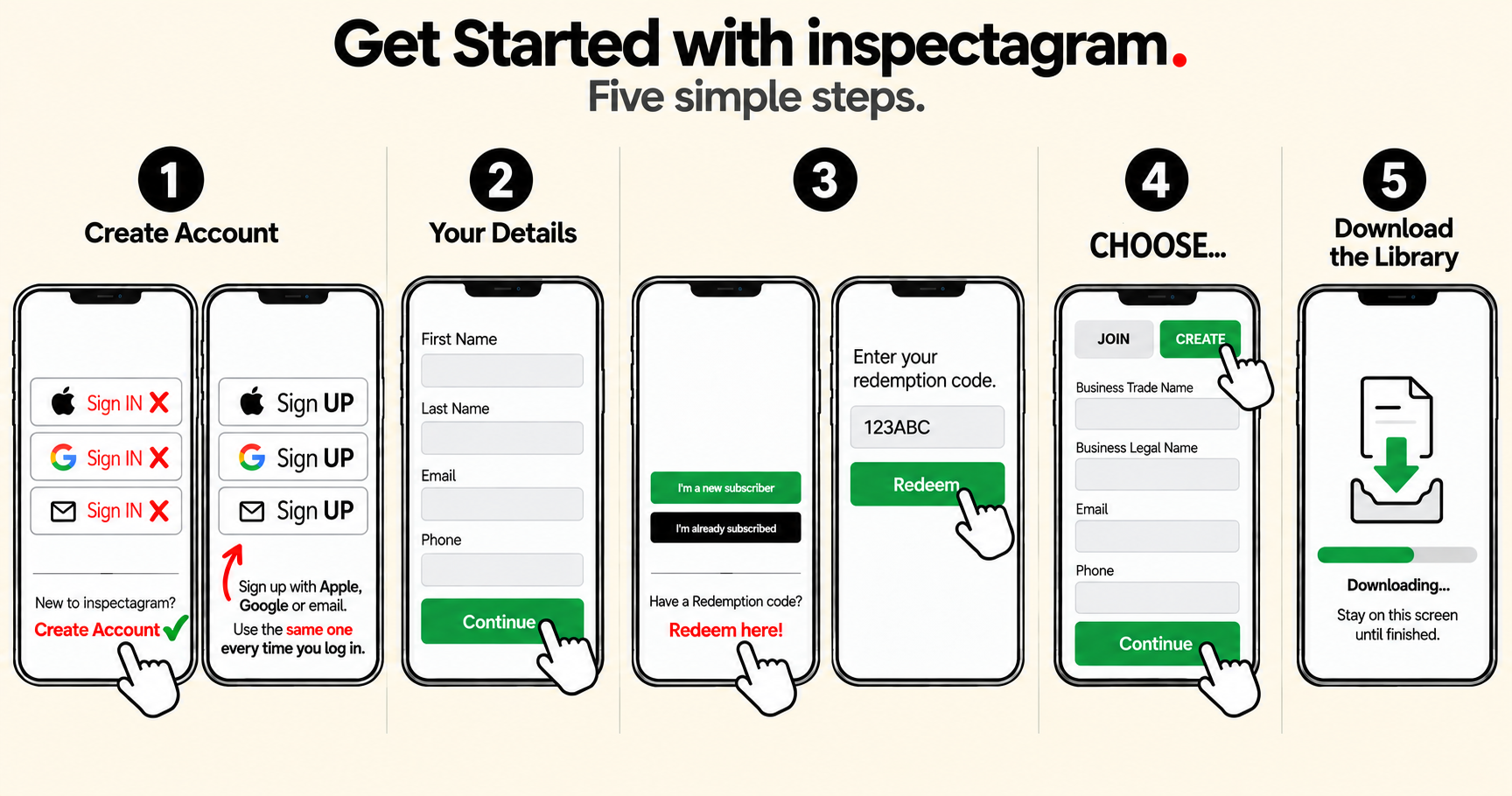
You're ready when: your code is redeemed and you can open inspectagram.
TIP: Make sure you have Chat GPT (the free version is fine) on your phone.
2
Learn the method
A better way to inspect.
Open
Learn the method
A better way to inspect.
inspectagram is built to help you inspect more efficiently, get your time back and provide a better product to your client.
Traditional inspection software is built around inspecting system by system, taking lots of photos and using loose narratives.
More to capture. More to organize. More for your client to sort through.
Move through the home in the same logical order your client will experience the report.
Follow the major components already built into the template. Capture clear, close-up photos and rate them as you inspect.
Use talk-to-text to capture the small to medium observations that don't need another photo.
“I see this, period. I see that, period.”
Together, they let you inspect and build the report as you go.
Less backtracking. More efficient inspections. Clearer reports.
A consistent, repeatable process you can teach, trust and scale.
3
See it in action
Watch BASELINE + BLACKBOX work together.
Open
See it in action
Watch BASELINE + BLACKBOX work together.
See how BASELINE + BLACKBOX work together as you move through a section of the home.
4
Learn how to doccument multiples
What to do when you find more than one loose toilet
Open
Learn how to doccument multiples
What to do when you find more than one loose toilet
Example: You’ve completed the Bathroom Baseline and documented a loose toilet. You move into the powder room and find another loose toilet.
Go back to the original toilet component in the Bathroom Baseline and update the title to Toilet X2. If you find a third or fourth loose toilet, update it to X3 or X4.
If another toilet has a different issue, then add another photo or document it in Blackbox.
When the same issue applies to multiple instances of the same component, keep them together in the Baseline.
5
Learn the full workflow
Ready to go further?
Open
Learn the full workflow
Ready to go further?
Once you understand the core method, use the Full inspectagram Workflow Playlist to learn the rest of the inspection process.
Learn how to complete the Insurance section, generate and review your Summary, finish your report and work through the rest of the inspectagram workflow.
Efficient. Consistent. Repeatable.
A better way to inspect.