The inspectagram® Process
The inspectagram process is the foundational workflow used throughout inspectagram. By following a consistent sequence of Baseline → Extras → Insurance → Summary → Review, inspectors can improve efficiency, reduce backtracking, increase consistency and create more complete reports.
Why This Matters
Many inspectors approach an inspection as a search for deficiencies.
While identifying deficiencies is important, the purpose of an inspection is to document the condition of the home as a whole.
The most efficient inspectors follow a repeatable process. Rather than deciding what to inspect next, they follow a workflow that has already been designed to guide them through the home.
The Baseline tells the story of the home.
Extras provide additional documentation beyond the Baseline using Focus Pages, Black Box Notes and Extra Pages.
The Insurance section captures important property information.
The Summary communicates the most important findings.
The final Review ensures the report is complete, accurate and ready to publish.
Recommended Approach
Follow a simple process:
Baseline → Extras → Insurance → Summary → Review
The Baseline captures approximately 99% of the components within a typical home and creates the foundation of the inspection.
Once the Baseline is complete, document anything requiring additional explanation, photographs or dedicated reporting using the appropriate reporting tools.
Recommendation Reason
Following the same workflow every time improves:
- Consistency
- Efficiency
- Observation quality
- Inspection quality
- Report quality
The less time spent deciding what to do next, the more attention available to observe the home.
Step 1: Complete the Baseline
Think of the template like the original Mario video game.
The path has already been laid out for you.
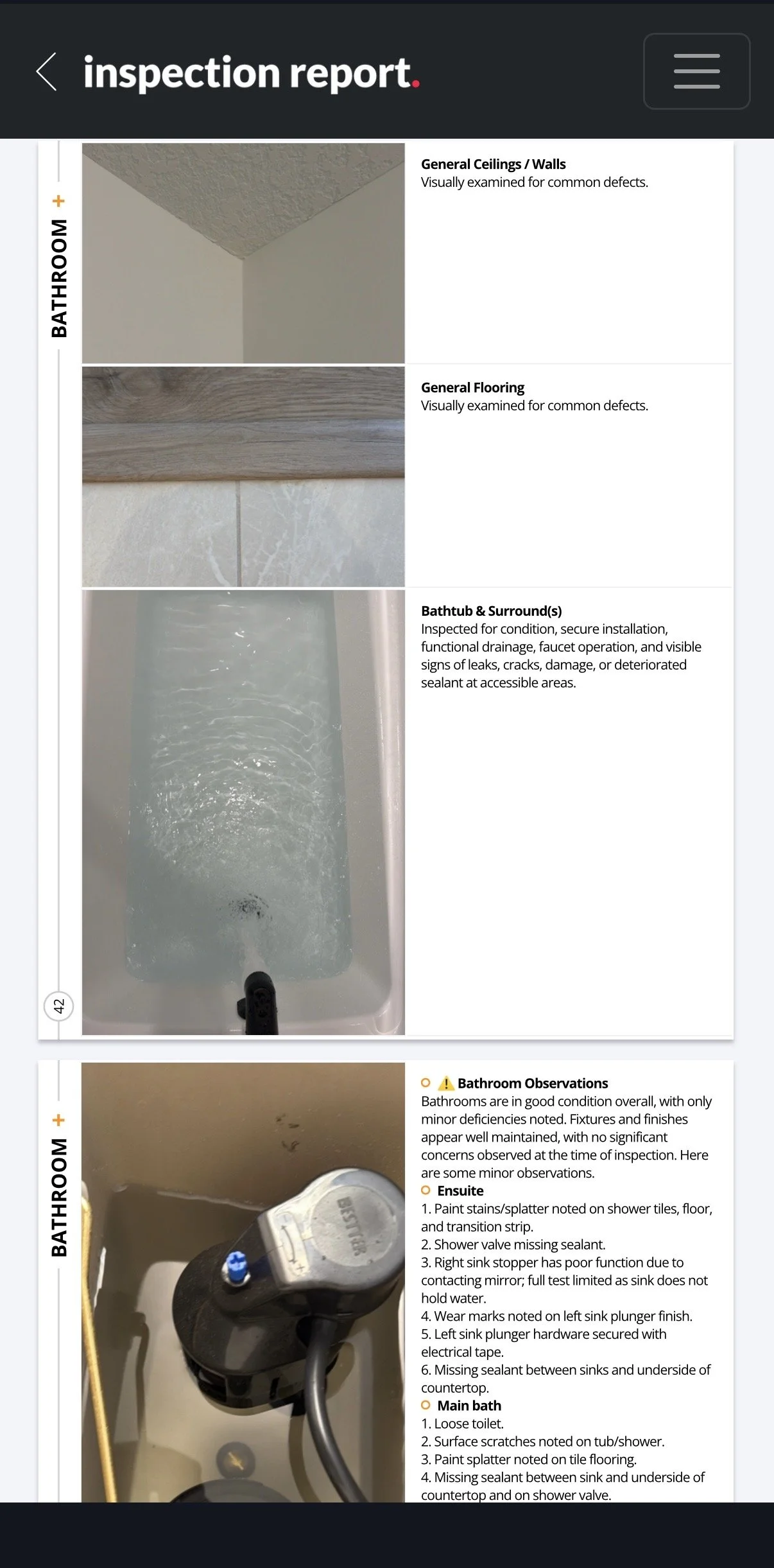
The Baseline consists of the provided template and the icons within each section. These icons are not simply photo locations. They create the flow of the inspection.
The icons act as a roadmap, guiding you through the home in a logical and repeatable sequence. Rather than deciding what to inspect next, simply follow the path that has already been built for you.
For most inspections, the Baseline captures approximately 99% of the components being documented.
As you move through a section:
- Tap the icon
- Capture the photo
- Rate the component
- Move to the next icon
Continue moving through the icons from left to right until the Baseline for that section is complete.
As you capture the Baseline, be aware of any deficiencies, concerns or additional items that require documentation beyond the Baseline. The goal is not to ignore them. The goal is to complete the Baseline first.
Once the Baseline for the section is complete, step back and document any items requiring additional documentation using the appropriate reporting tool.
By completing the required documentation first and then documenting exceptions, you maintain inspection flow, reduce the likelihood of missed items and create a more consistent inspection process.
Step 2: Document Extras
After completing the Baseline, use the appropriate reporting tool to document anything requiring additional explanation or documentation.
Focus Pages
Use a Focus Page when a feature, system or component requires dedicated documentation beyond the Baseline.
Focus Pages are pre-built pages designed for items that typically require multiple photographs and additional detail.
Examples include:
- Sauna
- Elevator
- Steam Room
- Hot Tub
- Secondary HVAC System
- Additional Attic Space
- Other specialty systems or features
Black Box Notes
Use Black Box Notes for small to medium deficiencies that do not require supporting photographs.
Black Box Notes work particularly well with voice-to-text.
Example:
"On the north wall near the top right corner there are several nail pops and areas of chipped paint."
Extras
Extras are blank photo pages located at the end of each section.
Use Extras to document deficiencies, concerns or conditions that benefit from supporting photographs beyond the Baseline.
Extras are available in multiple layouts and can be added, removed or reordered as needed.
If an Extra page is not used, leave it in place during the inspection and remove it during your final Review. It is generally easier to remove unused Extras than to add them back later.
Examples include:
- Structural concerns
- Roofing deficiencies
- Attic deficiencies
- Mechanical concerns
- Electrical concerns
- Plumbing concerns
- Safety concerns
If a photograph helps explain the condition, an Extra page is often the appropriate solution.
Extra pages can also be reordered within a section using the Edit button.
Step 3: Complete the Insurance Section
The Insurance section captures key property information that insurance companies commonly request and helps create a more complete property record.
Information such as roof age, heating type, plumbing materials, electrical service details and other property characteristics are frequently requested by insurance providers when underwriting or renewing a policy.
Completing this section creates a valuable reference for homeowners and may reduce the need for clients to search for this information later.
Complete the Insurance section after finishing the Mechanical section. Some information may also be gathered from MLS before the inspection. Many inspectors complete portions of this section while parked in the driveway before entering the home.
MLS information should be treated as a starting point only.
All information must be verified during the inspection.
The home itself is always the source of truth.
Step 4: Generate the Summary
Generate the Summary after:
- The Baseline has been completed
- Extras have been documented
- Insurance information has been verified
A complete and organized report produces a better Summary.
Once generated, review the Summary to ensure it accurately reflects the overall condition of the home and the findings documented throughout the report.
Step 5: Review the Report
Before publishing the report:
- Ensure photographs are clear and properly framed
- Remove unused pages
- Confirm all icons have been replaced with photographs
- Verify the Insurance section is complete
- Review ratings and comments for accuracy
- Confirm Focus Pages and Extras have been completed where necessary
- Ensure the Summary is clear, accurate and easy for the client to understand
The Review process is your final opportunity to improve clarity, correct errors and ensure the report presents a complete and professional representation of the property.
Common Mistakes
Complete the Baseline first, then document Extras.
The icons represent a workflow, not simply photo locations.
Focus Pages for specialty systems and features.
Black Box Notes for observations that do not require photographs.
Extras for deficiencies, concerns or conditions that benefit from photographs.
MLS information should always be verified during the inspection.
Reviewing the report before publishing improves accuracy, consistency and client understanding.
Key Takeaway
Follow the same process every time:
Baseline → Extras → Insurance → Summary → Review
The Baseline captures approximately 99% of the components within a typical home.
Focus Pages, Black Box Notes and Extras are used to document anything requiring additional explanation beyond the Baseline.
Follow the path.
Complete the Baseline.
Document Extras.
Verify the Insurance section.
Generate the Summary.
Review the report.
Publish with confidence.
That's how inspectagram was designed to be used.